Support is built into the app.
The fastest way to get help is a Help & Feedback conversation inside Chilltacular. Your message reaches a real person, and the reply shows up right back in the app.
Start a conversation
Opening a support case takes about a minute:
- Open Help & Feedback. On iPhone and iPad, tap your avatar in the top-right corner to open Settings, then tap Help & Feedback. On Mac, choose Help ▸ Help & Feedback… from the menu bar, or click Help & Feedback at the bottom of the sidebar.
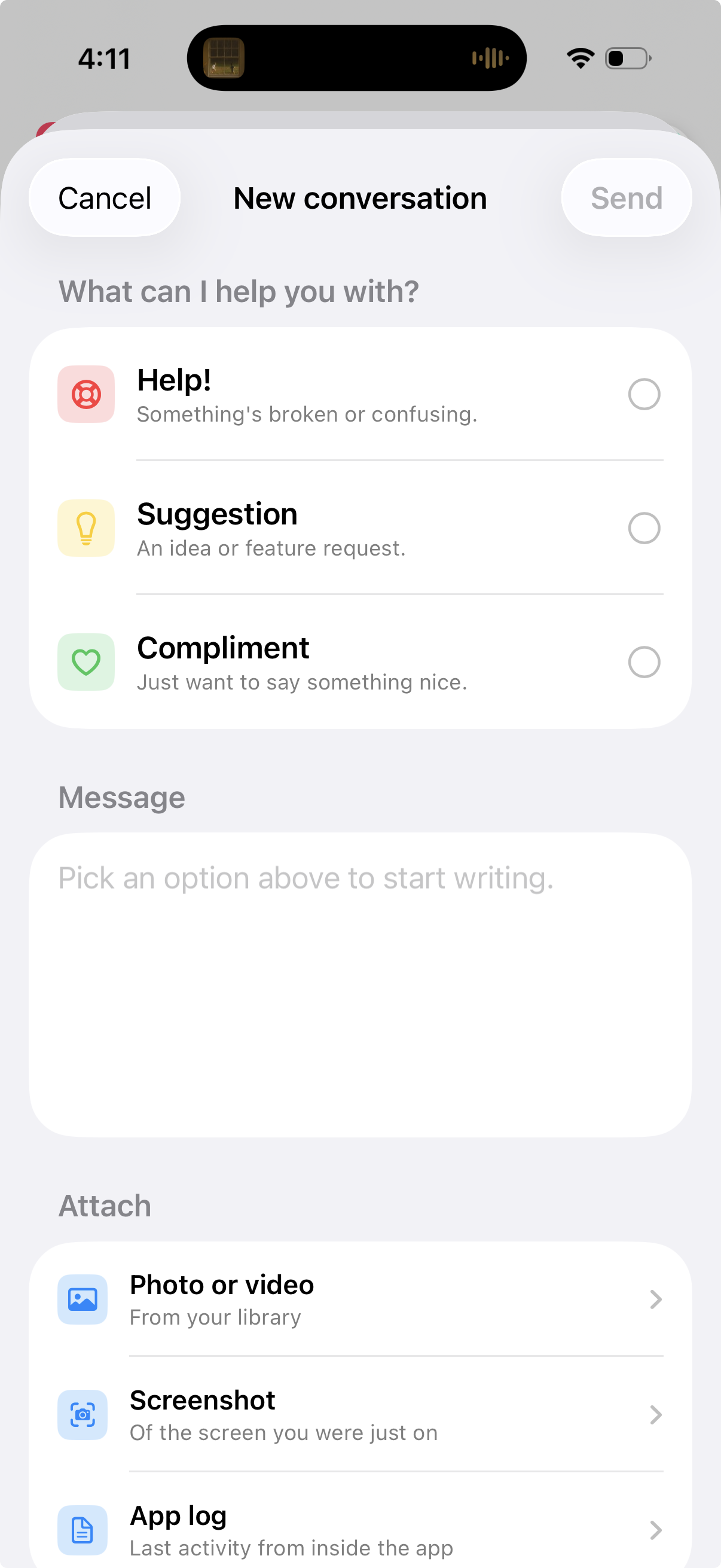
- Tap New Conversation and pick what kind of message it is — Help! for something broken or confusing, Suggestion for an idea, or Compliment if you just want to make our day.
- Write your message. The more detail the better: what you were doing, what you expected, and what happened instead.
- Attach anything useful — a photo or video from your library, a screenshot of the screen you were just on, or the app’s own log.
- Hit Send. That’s it — no account, no ticket number, no email required.
Where the answer shows up
Replies land right back in the same conversation inside the app. When there’s something new, Help & Feedback shows an unread badge, so just pop back in to keep the conversation going. Everything stays in one thread — no digging through your inbox.
📎 Attachments do the heavy lifting. For anything visual — a layout glitch, a wrong poster, a button that isn’t where it should be — the built-in Screenshot attachment captures the screen you were just on. And for crashes or sync weirdness, attaching the App log tells us exactly what the app was doing. You can see (and control) everything the log records in Settings.
Prefer email?
No problem. If you can’t get to the app — or the problem is getting into the app — write to us at support@chilltacular.com and we’ll take it from there.
Stuck? Don't stay stuck.
Open Help & Feedback in the app, or email support@chilltacular.com.